Advertisement

Let it snow Google "Let it snow"


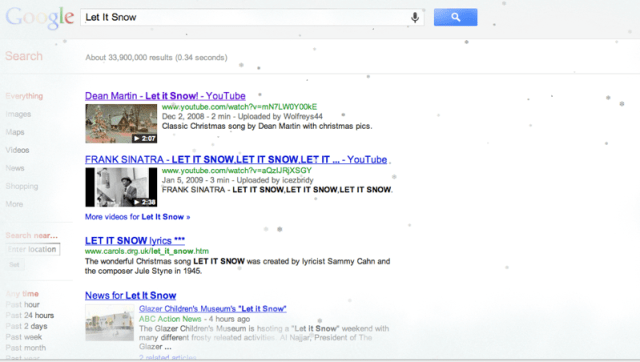
Google-Never seen snow fall?: Type Let It Snow In Search


Google has already shown a handful of it's "Fun Easter Eggs" previously :P The barrel roll was a famoous one! Look's like another of these fun easter eggs has arrived for the winter holiday this time.

GUYS! Its beautiful! Now's the chance for you to see snow flakes on your device. Its a real treat forn those who haven't seen snow fall. Simply type "let it snow" in google search and you'll see beautiful snowflakes pouring down the page! ;) Remind's me of Dean Martin's "let it snow" :P Enjoy GUYS ! Have a blasty Christmas! =D


it's look like this..!


0 comments:

Advertisement

Pakistan's biggest tennis star getting married! Aisam ul Haq Qureshi


One half of the Indo Pak pair in tennis doubles, Aisam ul Haq Qureshi gets married today 

on Saturday, December 17. This is great news for all tennis and non tennis fans accross 

the country. Aisam is getting married to his long time companion and friend 'Faha Akmal'. 

The wedding ceremony will be held in Aisam's home town in Lahore. The beautiful Faha 

Akmal belongs to a well established and a good family which has lived in Britain for many 

years. Faha Akmal had been working with Pakistan High Comission in the UK. 

The other half of the Indo Pak pair in doubles tennis, and good friend of Aisam, Rohan 

Bopanna has also arrived at Lahore to attend the wedding ceremony. 


Latest Picture


0 comments:

Advertisement

The Torjan Virus is on the walls of everyone at facebook!


Not a good day at the office for me! A massive and deadly Facebook scam/virus is attacking the walls and inboxes of me and all my friends :(  Now ofcourse there're two kinds of facebook users, "The laymen" and "The tech geek". 


My advice for the Laymen :P : Guys and girls! This is important! If you reveive any facebook message or link with a questionable subject line , do not dare to click on the links found in the bodies! These questionable titles are like "Hey! You're great!", "Your ass look's not bad in the video", "Someone has a hot crush on you ", and other links like "Hey ! I can see you Shall we hang out? ". These links lead to a serious trojan virus and we strongly recommend not clicking on these links or otherwise the consequenses maybe very harmful or embarrassing.  


Now for my fellow tech geeks out there! ;) This trojan virus is actually a trojan worm which sort of hypnotises people, showing them that the mail is from facebookmail.com, where as it actually originates from a dangerous scam network! People of all ages , especially young people including young boys and young girls are enticed to click on the picture or video links , mostly because these links are made attractive either by using nudity, seduction or some money making techniques! Once a user click's on one of these scam links , what happen's is that , strange nude video and other dangerous links are posted on the walls and inboxes of all users in the friend list of whoever clicks on such links. One user clicks on suck a link and the link gets delivered on his or her's behalf to all the friends in the friend list , and the chain goes on and on. This is getting embarrasing and dangerous! Has your privacy been so insecure ever on facebook as it is now? You can leave an answer in our weekly polls ! 


Now what the virus actually is in software terms. Recently, antivirus giants Symantec declared that this trojan virus works through a worm called W32.Koobface.A that searches for cookies in the user's machine. 


On finding the appropriate facebook cookie, the user's account and profile settings are automatically modified. This results in links to malicious sites being created on the walls and inboxes of our buddies without us even knowing anything! Our only fault is that we clicked on the link! The link mostly looks like a youtube video link. The link is made nude or convincing by other means, and the users are attracted to clicking it. On clicking it, the user is taken to a page where he or she prompted to install a video software to play the video :O. This completely fools teh user! This is a fake installation and installing it does the trick for the scammers! On installing it the files and settings of the user are breached resluting in his or her's facebook account getting destroyed! 


The sad thing is that so many users are clicking such links everyday which is resulting in an increase in this trojan virus which is spreading lightning fast all around the world's facebook! And the even more sad thing is that there has been no official comment or reaction by facebook regarding the situation!. 


0 comments:

Advertisement

Row over Pakistan actress Veena Malik nude 'ISI' photo


Pakistani sensation Veena Malik has appeared in a fresh scandal today as she has been featured totally nude in the FHM men's magazine in India. The picture shows Veena posing nude for the cover and it also shows a tatoo on Veena's arm labelled "ISI"! PRETTY SHOCKING!

The 33 year old celebrity has denied claims of posing for any such magazine and has made it clear that the picture shown on the FHM magazine is an edited/morphed picture. The strange thing is that the chief editor of FHM India says he's fully confident of the 
truth behind the situation! Kabeer said that a video of the photoshoot was carried out between veena and FHM. Kabeer also declared that the company recieved an email from the actress which confirms the authenticity of the nude picture.

Veena who is currently in Mumbai, India said very boldly and angrily that she has never done such a thing in her entire life. "I have never posed nude for any magazine. My manager and the rest of the team is investigating the whole thing , and are looking to take legal action against the culprits. The Picure has been morphed! Its not me! Definetely not!". 

What makes this controversy even more intense is the response from Kabeer Sharma, who said : "I also have an email from Veena in which she's saying tha she has seen the pictures and is happy with them, and is looking forward to seeing the cover,".


The massive magazine cover has now become a massive discussing point all over the two countries, and the news is rapidly reaching Pakistani homes and all sorts of places! Links have started showing up on social networking sites to the picture! This is getting huge! Everywhere the news of "Veena Malik posing nude for FHM Magazine" is breaking out.

A very funny thing surrounding the scandal is another Pakistani actress Meera's tweet on Twitter , which says "Completely mad woman.".This is still fresh news which means one cannot say anything yet! Nothing has been proved or confirmed yet! The bottom line is that on the latest cover of FHM India mens magazine 
it is "Veena Malik posing nude".


Hava a Look..! interview of Veena Malik.


3 comments:

Advertisement

Charge your mobile battery using peepal leaf


Its very Strange But True Very True.

Now, you do not require any mobile charger... to charge your mobiles. Only there is need to use green leaf of peepal tree and after some time your mobile will get charged.

No soon the people came to learn this development, they tested it and found encouraging results. If your mobile has been discharged and you are inside a jungle then you need not to use any charger. You Should pluck two peepal leaves and your work would be done.

It is very good idea and easy to charge your mobile. You would have to open your mobile battery and connect it with peepal leaf. After that without shaking mobile set you should set the battery in your mobile set. After some time your mobile would be charged.

Though it is unbelievable but as soon as the residents of Chitrakoot came to know about the discovery they could not believe the news. But when they saw it practically then the incident proved true.

Now hundreds of mobile holders are using this technique and charging their mobiles.

Whereas according to the botanists, it is just changing mutual energy into electrical energy power can be saved in battery. Similarly, it is also possible. They said that it is the subject of research.

Step by Step guide to charge your mobile battery using peepal leaf:-
1- Open your mobile cover
2- Take out your battery
3- Take two to three fresh leaves of peepal/pipal/ashwattha tree
4- Touch the stub of these leaves on your mobile battery terminal for a minute
5- Clean the mobile battery terminal with the soft cloth
6- Put your battery again in your mobile and switch it on
7- Now you can see the result
8- If required repeat the process with fresh leaves
Little Legends :D


2 comments:

Advertisement

So many things that Windows 7 does, and Windows Vista Doesn't!


Ever since it's release many non professional computer users have been declaring Windows 7 as mere copy of the previous version - Vista. I personally declare these people wrong. I do agree with them in a way that Windows 7 looks very much like Windows Vista, but there are many things and goof features that we are overriding when we say that Windows 7 is almost the same as Vista.


No! It isn't the same as Vista. This time Microsoft seems to have paid more attention to the feedback that was provided earlier, and have not built just an operating system, but a very capable operating system in Windows 7. So for those non professional computer users out there, What's there in Windows 7 that wasn't in Vista? Well! Here are some of the very  cool and massively useful things Windows 7 is capable of doing :


1 ) Windows 7 has the ability to open several windows open at the ame time e.g like 15 notepads, two Microsoft word windows, and 40 windows outlook windows. It also has the ability to minimize all these windows except the most important one! 


2) JUMPLISTS. Now this is something new to windows users. It is a massively useful feature. What it does is that it gives the user an option to view the list of recently opened files in any application. An example of the use of the jumplist feature is that we can access one of our favourite playlists in Real Player without even starting up Real Player. This can be done by right clicking the real player shortcut! If you are having problems accessing jumplists by right clicking then you can also access them through the start menu where they get integrated automatically alongside a particular shortcut ! EASY!

3) Hovering over a minimised window just got more advanced! In Vists while hovering on a minimised window you got just got the preview of that window, but in windows 7 along with preview we also have the close button which gives us the feature of closing the window without maximizing it or right clicking it. To switch between previews we can use the win + T shortcut.


4) Resizing of windows had also moved a step further. This time around instead of taking the mouse pointer to the far end of the screen to maximize a window, we also have the option to drag the window towards the top. Doing so will automatically maximize the dragged window. We can also drag it to the right or left to resize it so tha it fits on half the screen.  


5) The new XP mode feature! Now all the worries of xp compatible programs not running on windows 7 have faded away , as we now have the XP mode. This mode can be downloaded free from Microsoft's website.


6) Multiple Displays. Win + P is the shortcut for this all new feature in Windows 7. Shifting displays from one monitor to another now takes seconds using just one shortcut key. Man! It doesn't get any simpler than this!


7) Screw the notification area. Sick and tired of the clock and notification icons on the bottom of your screen? Yes! Now you can remove these. Click the arrow that is there in the notificaions area. And then click customize. From here you can hide any icon or even the entire bar depending on your choice! 


8) Weak Eyesight? If you or someone else has vision problems, then there's the Windows Magnifier is there at your aid. The magnifier has a small size and doesn't take up much area. 


9) Now you can have a preview of your media files without having to open them in a player. The preview player is now more advanced as it has everything form the album art to the basic music functionality. It also has a link which opens up the full media player. Pretty COOL!


10) Streaming media directly to another PC/laptop. Doesn't get any better than this ! Whhich music lovers wan't to listen to music on their stupid laptop speakers? :P Now we can  stream music direcly to another computer if both are connected to a created homegroup(which is created in windows 7). This way we can play music on our laptop and get the sound output form our cool 7.1 surround speakers which have been connected to our PC.! WOOHOO! 


GUYs! There are many other things that Windows 7 can do, and Windows Vista cannot! I will post them most probably in the next article!


0 comments:

Advertisement

4 very useful ways to password protect your computer in Windows!


Passwords are one the very first initiatives a person thinks of, when considering his or her's privacy or computer security. Now we all know that we can create multiple accounts on Windows and assign passwords to them, but as our data get's more precious we would wan't the password barricade to be as strong as possible. In this article I'm going to go through some of the finest ways of password protecting your computer on Windows which are very rarely found elsewhere. 

1. Creating Desktop Shortcut for PC Lock

This is pretty easy. Just go to your windows desktop, right click on any empty space, select new shortcut. Now where it asks for the location of the item , simply paste this address there : %windir%\system32\rundll32.exe user32.dll,LockWorkStation. Save your shortcut and make sure it is clearly visible to you on your desktop and that you can access it quickly in case of any emergency and also that your shortcut has a name which only you 
understand. Ok now whenever you wan't to lock your computer, just double click the shortcut and your computer will be locked. 

2. Using USB flash drive as a lock!

Ok now the name might seem unfamiliar to most of you, "Predator" is the name. Its the name of a software that is compatible with most versions of Windows and has the funcionality of locking or unlocking your computer. Now , this USB lock method doesn't work like the other conventional methods of locking. The USB drive which has been setup for locking your computer acts like a power switch. It either locks or unlocks your computer. When the USB drive is removed, major input devices including the mouse and keyboard are locked and the screen goes blank or dark. In case the flash drive gets damaged, you can still access your PC , but you will need to know the exact password. Hit space bar 5 or 6 times and you will 
be prompted to enter the password. Enter the correct password or a very nasty alarm would sound. If you need a guide on how to use the predator software on windows then mail us . We will post a guide on that too asap. 

3. Setting up BIOS password

This method isn't the best of the 4 methods I'm describing, but it sure is a handful because it's pretty simple. Depending on your computer system, during startup press either del or F1 to enter the BIOS . Once at the BIOS, navigate to the security tab, and set the 
password. In my case I had two options: 1) Set User Password 2) Set Supervisor Password.

4. Setting up Hard Disk password 

This method is probably the best of all and personally the one I would chose out of the 4. This password ia almost impossible to access. In some computers the hard disk password and the BIOS password are linked and in some they aren't. You can set the hard disk password using the BIOS. 

Warning! Use this method at your own risk because if you forget your hard disk password there is no way you can access it again, and your hard disk can then be thrown in the trash can! So be very very carefull when assigning a password to your hard. The drive platter and a particular chip on the hard disk mother board are the only two areas where the password is stored. So this clearly says it all! There is no back door to accessing or resetting the password if you lose it! This method is very good and at the same time its very risky too!


0 comments:

Advertisement

Dual Booting Windows 7 and Xp


With your shiny and stylish Windows 7 already installed, you are willing to have your trustworthy Windows XP alongside in a dual setup. You're come to the right place , because here we'll guide you on the procedure of dual booting XP and 7 with 7 pre installed non your PC/laptop. Man y would say that it isn't possible or it may give errors, but trust me it works. So here's how it goes:

Firstly, and most importantly we will need to shrink the hard drive where Windows 7 is installed, to free some space to use for XP. For this we will first need to create a new parttion. Open Start menu, right "Create and format" in the search box . Click on the "Create and format hard disk partitions" button that appears after your search.

If done so, you will be brought to a new window called "Disk Management". Make sure you know the letter of the drive where your Windows 7 is installed. Ok now go on and select the drive where your Windows 7 is installed. Let's suppose it is C. Now right click drive C, and click on shrink volume. Now a new window should pop up with the heading of "Shrink C:". Now keep in mind that for Windows Xp , about 10 GB of disk space is more than enough. So 
where it says "Enter the amount of space to shring in MB", enter 10 000 and click on shrink. It might take a few seconds or minutes depending on the speed of your system. 

Ok so we''re done with the shrinking part. The screen will now show a new box saying 10 GB of unallocated space alongside drive C. Right click the unallocated space and click on New Simple Volume. A new window should pop up which is a pretty simple one. Make sure that the file system is selected to NTFS and the allocation unit size to Default. Where it says "Volume Label", just name the label to something like "XP Space" so that it is easier for you to identify the partition when setting up XP. Click on next and after the formatting is done you will see your new volume as Healthy (Primary Partition). Well done! You're half way through! Just to check that you're going correct up to this point, open My Computer and see that the new volume that you created is available or not. If not, then don't worry read it all over again and follow each step carefully. 

Restart your computer. Insert the XP installation disk into your CD/DVD drive and boot setup from it(just click any button when it says "Click to boot from disk..."). A blue screen should appear with three options. Just press enter. Now chose the partition that you 
created. You should remember the volume label's name that we set earlier in this tutorial. After selecting your partition format the partition by selecting "Format using NTFS file system(quick)". Press Enter and the Windows installation will now begin. 

Listen Guys! If you need a tutorial on the boot loader do let us know!


2 comments:

Advertisement

Over 40,000 apps now at Windows Phone Market Place!


Besides just grabbing massive attention of the users and the people over the past one year or so, the Windows phone platform is massively growing in popularity amongst the designers and developers who have begun to prefer the Windows platform over others. 

Software giant Microsoft has reached another milestone, as Windows market place now has more than 40,000 apps in its Arsenal. Some facts about the app marketplace are as follows: 

1) Amongst the 40,000 apps and games, there are about 10,000 different publishers and developers.

2) 33% of the total apps and games have been added in the past 3 months.

3) Out of the total 40,000 , about 85% are apps, and about 15 percent are games.

4) 68% apps and games are free downloads, 23% are paid and the remaining 9 percent are the ones that require payment after a certain trial period. 

The amazing thing about the Windows market place is that the apps and games are being added at a massive rate of about 160 per day. This is huge! Huge in the sense that the marketplace itself was launched just a year back in October 2010! 

Microsoft is most likely to get an added boost when AT&T, who are currently in talks to offer windows Nokia Smart phones to users in the US next year.


0 comments:

Advertisement

windows media encoder


Windows media encoder is a multimedia software by Microsoft which is known for it's main functions of converting and capturing either live, or prerecorded media formats which include audio, video and images. Previously, Netshow encoder was used which was later replaced by Windows media encoder. Netshow encoder may still be available at some places on the internet and/or old CD's. 

There have been many versions of the Windows encoder ever since it came out, the latest one being Windows media encoder 9. Windows media video versions 7, 8 and 9 are used to encode video and the audio encoding is done by various windows media audio versions including 9.2 and 10. Media is/can be created in both 32 or 64 bit versions and can also be created in uncompressed audio or video formats.

The 9th and latest version of Windows media encoder, instead of just CBR and single pass encoding also supports two-pass encoding which used the variable bitrate theory. VBR (Variable bitrate ) is to optimize the quality and it's main purpose is the download and play functionality. VBR is used to ensure the highest quality.

If purchased legally, Microsoft Windows media encoder comes along with a bundle which includes Media file editor, media profile editor, and media stream editor as bonus softwares. A free/trial version of the encoder is available at Microsoft's official website for download. However, like all other softwares around the world, full versions of the Windows media encoder can easily be found on torrent hosting sites and/or other media/file sharing sites. But these methods are applied at the users own risk as piracy of softwares is strictly a crime throughout the world.


0 comments:

Advertisement

Highlights - Main features of Windows 8


Windows 8 is going to introduce its users to a very new user iterface with the name of "Metro". Now the regular windows start menu will be replaced by the newest user friendly start screen which will feature touch input as well. All shortcuts and applications will be metro styled and one can say that this interface to some extent is quite similar to the one found in windows phone.Besides the thumb print identifier and the traditional password input methods, this time windows will introduce the latest authentication method that requires the user to sketch on three different areas of a particular picture. 


Windows 8 is said to have another feature. This feature is the support of USB 3.0 and this time there's no need to load drivers. One of the main highlights of this higly anticipated windows version is the "Windows to Go". This is the name given to the feature that will allow users to run windows from a USB flash drive. Also in this version of windows will be the support of multiple monitors with the ability to display different backgrounds at the same time on different monitors.|

Another big and very useful change that users will notice in windows 8 is that the user accounts on a system can be linked with one's windows live ID. This means that all the settings anf files would be safe as one shifts from one computer to another. A new Hybrid Boot feature will be available that allow even fast start ups through advanced hibernation techniques. Windows 8 will also include a very new user interface for the Task Manager.


0 comments:

Advertisement

Window 8


The longly anticipated Microsoft's Windows 8 isn't that far away from reaching homes and offices officially. The thing that makes it even more special this time is that windows 8 is pretty much different from the previous versions of windows. Unlike the previous versions ,this windows 8 supports ARM microprocessors too. In addition to the mouse, keyboard and pen input device access, windows 8 also supports the latest start up screen interface for touchscreen input. These are the main additions to the newest version of windows which is yet to be released.


Like all previous versions of windows and various softwares around the world the beta versions of windows 8 got leaked. In April 2011 a beta version was leaked to major P2P and torrent sharing networks. In August 2011 another build of the beta version was leaked to the famous torrent sharing network called "The Pirate Bay". Likewise another build got leaked to Beta Archive in May 2011.


The Aero style found in Windows 7 is till there in 8, and this time windows also supports taskbar thumbnails and taskbar thumbnail menus. Till windows 7, the close , maximize and minimize buttons had been enclosed in boxes. This time these boxes have been removed, with just the buttons remaining.


Some official announcements have been made by Microsoft. These include the announcement of the release of Windows 8 in 2012, however not specifying the exact date and month.


0 comments:

Advertisement

Google Adsense and Adwords disable in pakistan


Hello Guys i know adsense and adwords users feel so bad now because google show us Ass. Don't worry guys i am also with you :p because my adsense also disable. Google adsense also change policy to approve account now google check 2 time account that's much fucking i think what ever now time to find local advertiser to earn money. Google also do this in India and all in Asia. if you have any friend or czn in uk usa try your luck with your friends and czns lolz


0 comments:

Advertisement

Sony Ericsson VH-700 Noise Shield Handsfree


Sony Ericsson VH-700 Noise Shield Handsfree

Manufacturer Logo
Product Reference: 23405
Every detail is for super sound quality. Changeable earbuds fit snugly to block noise and get you into the bass - without disturbing anyone else.

Description

Why Buy:
  • Stylish and discreet design
  • Fast charging via microUSB
  • Full duplex echo cancellation and intelligent realtime noise reduction
  • Universal Bluetooth compatibility
  • Multipoint support
Stylish and discreet design
The Sony Ericsson VH-700 Noise Shield clips onto your clothing, and the earpiece is attached by a wire for maximum portability. With a range of earbuds included, you can be sure of a perfect fit, and the lightweight body of the device is small enough that you'll hardly notice it's there.
Fast charging via microUSB
Using a standard microUSB port so you can use existing chargers, the VH-700 charges to at least 90% from empty in just two hours. That gives you more time to talk and less time waiting around.
Full duplex echo cancellation and intelligent realtime noise reduction
Full duplex digital echo cancellation means that your conversation is heard clearly at both ends. And what you say is only heard once. A dual microphone system enables the Bluetooth™ Noise Shield Handsfree VH700 to pick up your voice out of the background noise so you can be heard clearly by the person you're talking to. Background noise is digitally reduced in real time for clearer and easier conversations.
Universal Bluetooth compatibility
All Sony Ericsson wireless devices have been developed in coordination with Sony Ericsson mobile phones, but are also compatible with Bluetooth-equipped handsets from other manufacturers.
Multipoint support
Pair two or more phones to your Bluetooth accessory so you can use multiple phones at the same time.

Key Details

  • Multipoint: Yes
  • Micro USB Charging: Yes


0 comments:

Advertisement

Acer Aspire 1830T Timeline X Review


Acer Aspire TimelineX AS1830T-3721 Notebook
Acer Aspire 1830T
Reviewer Rating: 
Review Summary:
A well balanced ultraportable with good battery life and a not-so-good touchpad.
Pros
  • Good performance
  • Excellent battery life
  • Thin and light design
Cons
  • Uncomfortable touchpad and touchpad buttons
  • Lacks gaming capability

Acer Aspire 1830T Timeline X Full Review

 
If you want a netbook because of the convenient size and amazing battery life but need better multitasking and video performance than what a cheap netbook offers then the Acer Aspire 1830T might be the perfect notebook for you. Keep reading to see what this $900 ultraportable offers.
BUY the Acer Aspire TimelineX AS1830T-3721 Notebook
Our Acer Aspire 1830T-68U118 feastures the following specifications:
  • Intel Core i7 680UM processor (1.46GHz, 4MB L3 cache)
  • 11.6-inch 1366x768 HD display with LED backlighting
  • Windows 7 Home Premium (64-bit)
  • 4GB DDR3 memory
  • 500GB 5400rpm HDD
  • Intel HD integrated graphics
  • Gigabit Ethernet and 802.11n wireless
  • Bluetooth 3.0 (Foxconn BCM92046)
  • 6-cell Li-ion battery
  • Dimensions: 11.22 (w) x 8.03 (d) x1.01-1.10 (h) inches
  • Weight: 3.09 pounds
  • MSRP: $899.99
Build and Design
The Acer Aspire Timeline X series is the latest generation of thin and light notebooks from Acer designed to offer solid performance and long battery life in a surprisingly lightweight package. At first glance it's easy to mistake the Aspire 1830T for one of the dozens of Acer netbooks that have shown up over the last few years. Looks, however, can be deceiving.
Build quality is quite good despite the diminutive size of this laptop. The combination of relatively thick matte plastics and black brushed aluminum palmrests leave the notebook feeling solid and showing almost no signs of flex. The screen stays firmly shut with a good amount of tension from the screen hinges when closed. Protection from the screen cover is only adequate; the cover flexes quite easily and distortions appeared on the display when we applied pressure to the back of the cover. Opening up the screen you can tell the hinges should hold up for a long time with strong tension that prevents the screen from flopping around once opened. The body of the notebook seems to be well designed with minimal chassis flex and no obvious creaks from the plastics.

One area of the design that impressed me was the bottom of the notebook. The expansion bay provides access to the hard drive, the WLAN and optional WWAN card slots as well as two RAM sockets. The single cover panel is held in place by five screws (my only complaint), so you'll have a spend a minute or two loosing all of those screws before you can swap out the hard drive or add more RAM. That said, I'm always happy to see when manufacturers make it easy for owners to upgrade their notebooks.

Ports and Features

Port selection on the Aspire 1830T is fairly standard for a modern netbook or 11-inch ultraportable notebook. Acer gives you three USB 2.0 ports, HDMI-out, VGA, LAN, and audio jacks. It also features a SDHC-card slot for expanding internal storage or just loading images off your camera while traveling. Since we're starting to see USB 3.0 on more consumer notebooks and there are many USB 3.0 external hard drives on the market we really wish Acer had found a way to put at least one USB 3.0 port on this $900 notebook. Here is a quick tour around the Aspire 1830T:

Front View: Activity lights

Rear View: Battery and screen hinges

Left Side View: VGA out, AC power 
HDMI-out and one USB 2.0 port

Right Side View: Media card reader, 
Audio jacks, two USB 2.0 ports, 
Kensington lock slot and LAN.


0 comments: